
Creating a Risk
To create a Risk, follow these steps:
- Click Risk Register in the navigation panel.
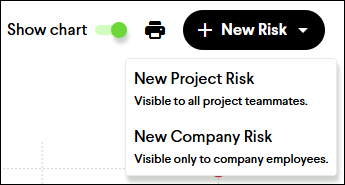
- Click the + New Risk button in the top right and select either
- New Project Risk
- New Company Risk
- Enter the name of the Risk (required field).
- Fill out as many of the other optional fields as you can.
- Cost Impact (ROM)
- Assignee
- Description
- Impact
- Likelihood
- Categorizations
- Click the Create button to create the Risk.

Note: Fill out as many fields as you like. Only the Name field is required. Don’t worry if you don’t have all the information. You can edit information later from the Risk details page.