
Smart Categorizations Overview
Assigning categories can be time-consuming when creating Items. With Smart Categorizations enabled, Join will suggest categories based on the Item's name and description, which are indicated by the -png.png?width=24&height=19&name=app-join-build_1267fcf6-a51f-45a1-87c4-7c33064a3b11_items_collapse%5B0%5D=UNGROUPED%26currentMilestone%5B0%5D=All%20Milestones%26integrations%5B0%5D=INTEGRATION_FILTER_INCLUDE_CHANGE_EVENTS%26integrations%5B1%5D=INTEGRATION_FILTER_EX%20(1)-png.png) icon. You can manually override the suggestions by selecting a new category from the dropdown.
icon. You can manually override the suggestions by selecting a new category from the dropdown.

Tip: Add a more detailed description for better accuracy of the suggestions.
Disabling Smart Categorizations
Disabling for the Project
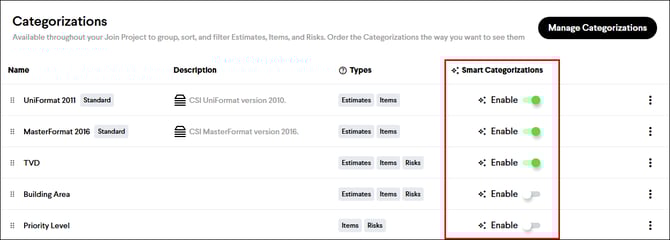
Smart Categorizations are enabled for all Item Categorizations by default. It can be disabled for each Categorization at the project level on the project Settings page, in the Categorizations section, by clicking the Enable toggle. This will disable it for all users on the project.
Disabling for Yourself
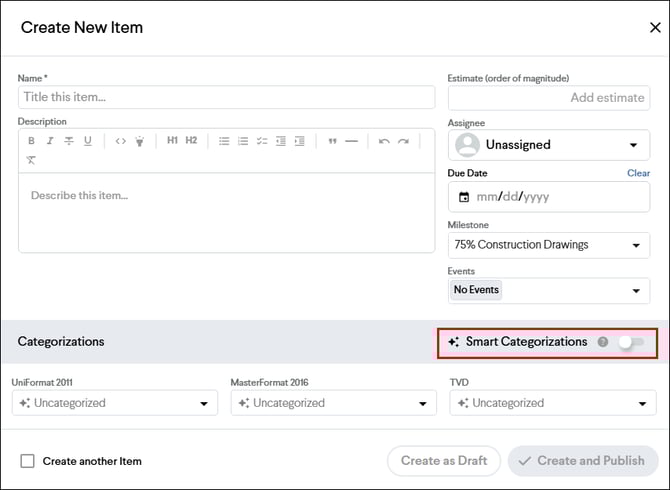
Smart Categorizations can also be disabled by each user when creating an Item by clicking the toggle in the Categorizations header. This will disable it for all Categorizations. This setting is unique to each user and persists across all your projects.
Note: Smart Categorizations are only available for Item Categorization Types, and can only be applied during Item creation, not after an Item has already been created.